What it is
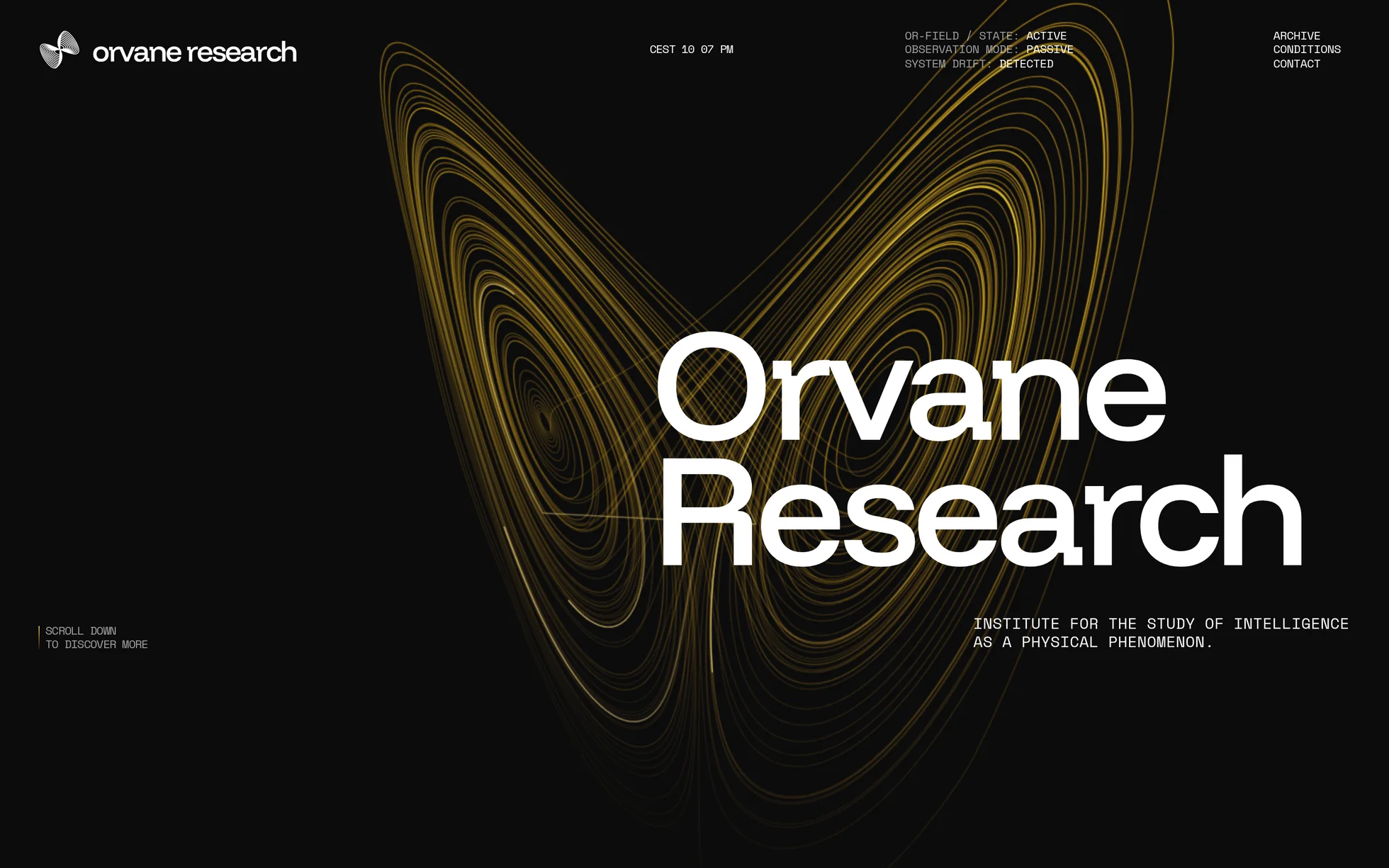
A one-page marketing site for a research institute: a hero, a statement of intent, an introduction, an archive of three works, three experimental conditions, a manifesto, a footer with a sign-up. One page, one HTML file.
What makes this site is its backdrop. A Lorenz attractor — the system of equations that gave the butterfly effect its name — is integrated once on load into 20,000 points, then redrawn every frame on a 2D canvas. Nothing moves within the figure: it's the camera that flies, from one framing to the next, in time with the scroll. Five framings, blended according to how much of each section has entered the screen.
The design comes from a Next.js site of which only the images and the structure have been kept. Everything else has been rewritten: the React and Turbopack runtime (700 kB spread over ten files), the CSS compiled by Tailwind, the Lenis scrolling library, the image optimiser that doesn't exist outside its host, and the wrapper that scales the whole page with a
transform: scale() recomputed in JavaScript.
What you change first
The colours — four lines
Right at the top of assets/css/style.css:
--encre:  #0c0c0d;            /* the background, and the text on the light section */
--papier: #f2f2f2;            /* the light section and the archive cards */
--accent: rgb(218, 132, 10);  /* the dot that replaces the cursor */
--focus:  #f5e100;            /* the focus ring on a dark background */
Two things to know before touching anything else. First, the colour of the animated backdrop isn't a CSS token: it's computed point by point in field.js, between rgb(55,30,2) at the bottom of the figure and rgb(255,185,12) at the top. Second,
the focus ring needs two values: the yellow holds at 14.6:1 on the black background and falls to 1.2:1 on the light section, where it disappears. That's where --focus-clair takes over.
The name
Search for “Orvane Research” in index.html. No CSS class carries the brand name: a find-and-replace can't break anything. That leaves the logo's two SVGs, in assets/img/.
The sizes
The type scale is declared once at the top, then redeclared at each of the three breakpoints. So a heading never gets its own media query: you change --t-heros and the large heading follows everywhere. If you find yourself writing a @media elsewhere in the stylesheet, you're probably missing a token.
The fifteen effects, and how they're built
All taken from the original's JavaScript bundle — durations, curves, offsets, the attractor's constants — then rewritten with no dependencies. Nothing was eyeballed.
| Effect | Where | How |
|---|---|---|
| Lorenz attractor | backdrop, full screen | 2D canvas, σ=10 ρ=28 β=8/3, 20,000 points, composite screen |
| Camera flight | same | 5 framings blended by how far each section has entered |
| Light trails | same | 4 comets of 180 segments travelling along the orbit |
| Pointer response | same | camera offset by ±8 px, points pushed away within a 160 px radius |
| Opening zoom | the backdrop | scale(1.05 → 1) and opacity, 1 s |
| Header fade | header | opacity 0 → 1 in 0.6 s, after a 0.4 s wait |
| Strapline fade | home | opacity 0 → 1 in 0.5 s, after a 1.4 s wait |
| Typewriter | 10 labels | one character every 50 ms, width fixed before clearing |
| Reveal line by line | all large headings | the script notes where the text wrapped, masks each line, raises it |
| Archive stacking | 3 cards | an 800 px stage held over 2,400 px of scroll, three eased thirds |
| Column parallax | the 3 conditions | three speeds: 0.06, 0.11 and 0.16 of the distance from the centre of the screen |
| Header switch | over the light section | the text and the logo turn black in 250 ms |
| Berlin clock | header | Intl.DateTimeFormat, colon switched off every other second |
| Link scramble | 3 nav links | letters drawn at random, one settles every 4 frames |
| Two-sided button | “Request Access” | two layers sliding by ±100%, the arrow switches sides |
What you should know
- No external requests. Every request on load is local, fonts included. The original loaded ten JavaScript files and ran its images through a host's optimiser.
-
Without JavaScript, nothing is hidden. The hidden state of the scroll reveal lives on an element only the script creates: until it has run, there's nothing to unmask. Checked by removing the
<script>: 13 headings out of 13, 32 paragraphs out of 32, the 3 archive cards in a list, and 0 masks set. - Zero inline styles, zero inline scripts. The template honours the site's strict security policy, checked by serving the folder with the header, not assumed.
- The trigger sits 15% up from the bottom of the screen, measured against the screen and not against the element as in the original. A threshold expressed as a fraction of the element never fires for a block taller than the window — and a block visibly enters instead of having finished before it was seen.
-
Accessibility: skip link, named navigation, form message through
role="status", decorations hidden from screen readers, focus visible on both backgrounds, andprefers-reduced-motionsetting the final states immediately — delays included. -
The native cursor is only hidden if there's a mouse. The rule is conditioned on
(pointer: fine)and on the first real movement. On a touchscreen, or without JavaScript, the system cursor stays. - Responsive checked at 390, 1440 and 2560 px, on load and throughout the scroll, with no horizontal overflow.
What isn't perfect
Better said here than left for you to find out.
-
The backdrop is expensive: 20,000 curves redrawn every frame, about 26 frames per second on a desktop machine. That's exactly the original's cost, measured side by side in the same browser (26 against 27). The lever is the
POINTSconstant infield.js: at 8,000 the frame rate doubles and the figure thins out. - The scaling wrapper hasn't been carried over. The original isn't responsive: it draws at a fixed width then scales everything in JavaScript, by up to +33% on a wide screen. This template reflows. At the four reference widths both pages are pixel-identical; between the breakpoints and beyond 1440 px, the original zooms and this one doesn't.
- The inertial scrolling is a simplified version. The original ships a 15 kB virtual scrolling library. Here the wheel pushes a target and the page catches up with it, in about thirty lines. Keyboard, scrollbar, anchors and touch all carry on working normally; the feel on a trackpad is slightly less refined.
- The canvas is rendered one pixel for one pixel, as in the original: on a high-density screen the strokes are slightly softened. One line to change, at the cost of 8% of the frame rate.
- The images come from the original site and their licence is unknown. They're there to show the layout; replace them before publishing. The fonts, Funnel Display and Space Mono, are under the SIL Open Font Licence and are freely redistributable — checked at the source.
It’s waiting for you in the library.
Orvane Research comes with the subscription, alongside the rest of the library and the full course.
Immediate access · No commitment · Cancel in one click